
LESSON 04 / Years 12 → 13 · Digital sensor
Acquire a temperature.
Understand conversion and errors.
The challenge
Read a real temperature without blocking during conversion. The DS18B20 is digital: D4 exchanges 1-Wire messages; it does not read a voltage proportional to temperature.
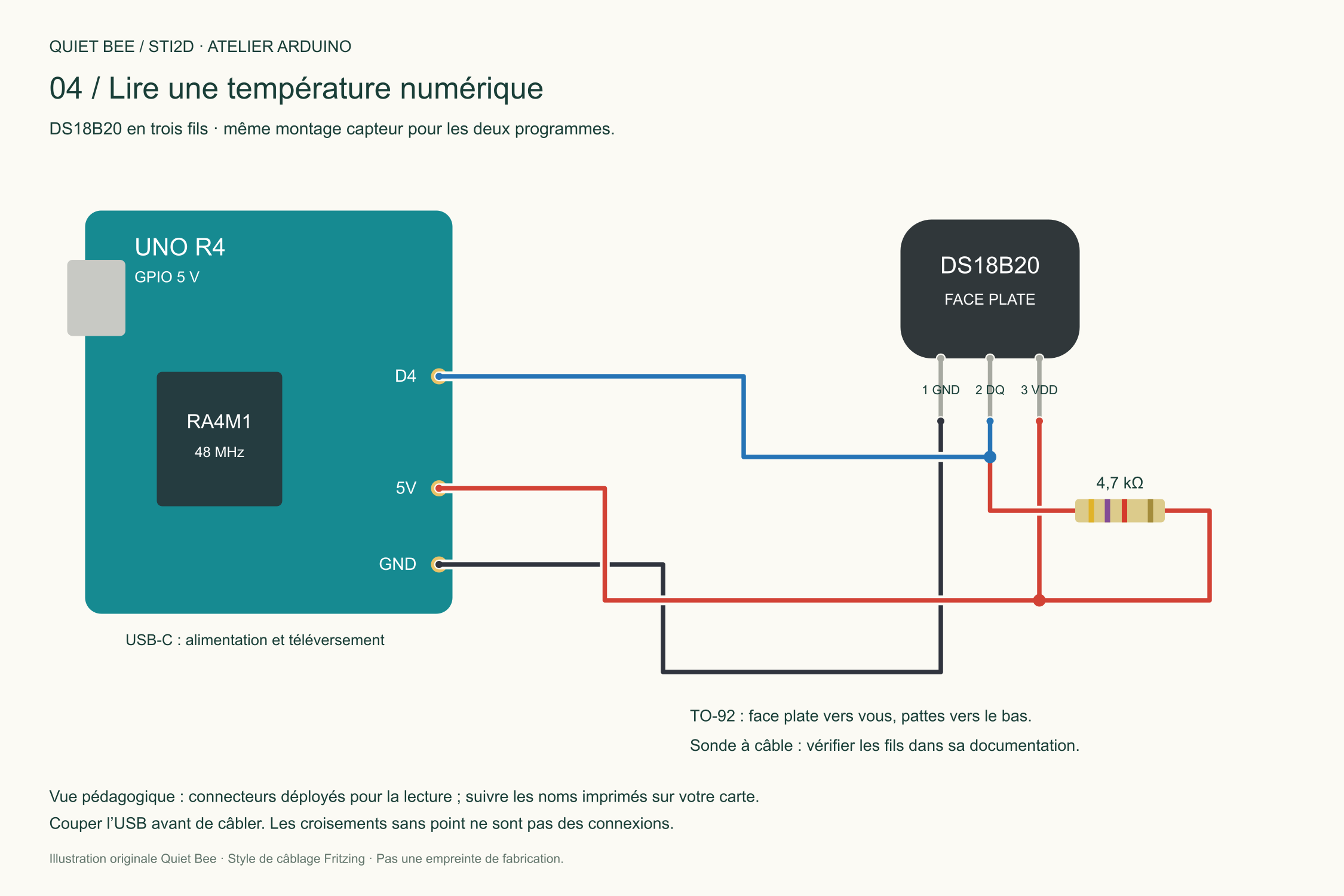
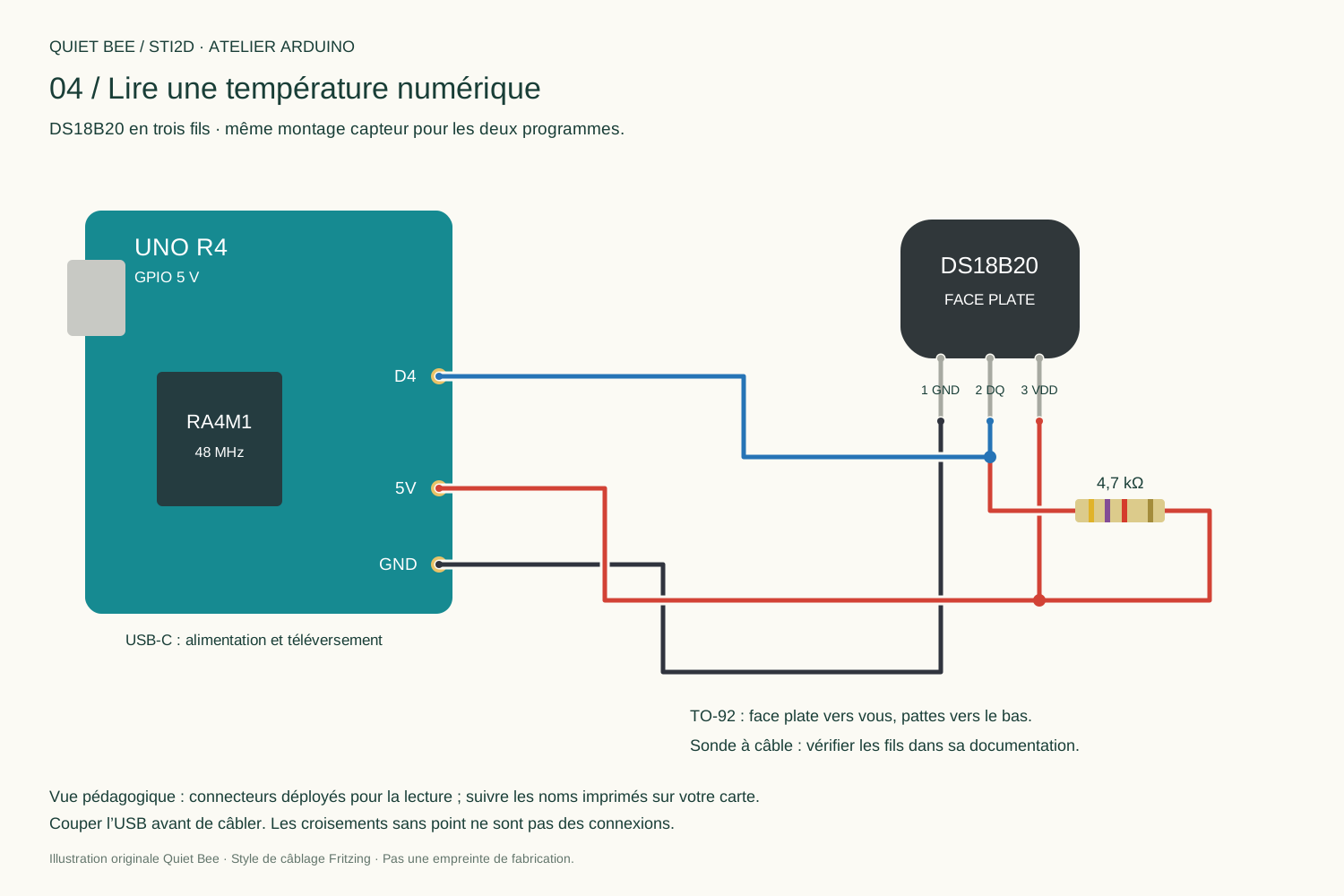
Equipment: DS18B20, 4.7 kΩ pull-up resistor, UNO R4 and wires. The TO-92 package makes the pinout visible; a wired probe requires documentation for its wires.
Wiring
| DS18B20, flat face towards you, pins down | UNO R4 |
|---|---|
| 1 / GND | GND |
| 2 / DQ | D4 |
| 3 / VDD | 5V |
| 4.7 kΩ resistor | Between DQ and 5V |
Three-wire power, not parasite mode. The DS18B20 accepts this voltage; not every sensor accepts 5 V.
Install OneWire by Paul Stoffregen and DallasTemperature by Miles Burton in Library Manager. Versions used for verification: OneWire 2.3.8 and DallasTemperature 4.0.6.
The complete program
04_temperature.ino
Complete project ↓#include <OneWire.h>
#include <DallasTemperature.h>
#include <math.h>
constexpr uint8_t BROCHE_DQ = 4;
constexpr unsigned long MESURE_MS = 5000;
constexpr unsigned long CONVERSION_MS = 800; // Marge au-dela des 750 ms a 12 bits.
OneWire bus(BROCHE_DQ);
DallasTemperature capteurs(&bus);
DeviceAddress adresse;
bool conversion = false;
bool adresseConnue = false;
bool mesureValide = false;
float temperatureC = 0.0f;
unsigned long debutConversion = 0;
unsigned long dernierCycle = 0;
unsigned long derniereMesure = 0;
void lancerMesure() {
// Recherche du premier capteur : reconnexion possible apres debranchement.
adresseConnue = capteurs.getAddress(adresse, 0);
if (!adresseConnue) {
mesureValide = false;
Serial.println("Erreur : DS18B20 absent");
return;
}
capteurs.setResolution(adresse, 12);
capteurs.requestTemperatures();
debutConversion = millis();
conversion = true;
}
void gererMesure() {
const unsigned long maintenant = millis();
if (conversion && maintenant - debutConversion >= CONVERSION_MS) {
conversion = false;
const float t = capteurs.getTempC(adresse);
mesureValide = isfinite(t) && t != DEVICE_DISCONNECTED_C && t >= -55 && t <= 125;
if (mesureValide) {
temperatureC = t;
derniereMesure = millis();
Serial.print("Temperature : "); Serial.print(t, 2); Serial.println(" deg C");
} else {
Serial.println("Erreur : lecture DS18B20 impossible");
}
}
if (!conversion && maintenant - dernierCycle >= MESURE_MS) {
dernierCycle = maintenant;
lancerMesure();
}
}
void setup() {
Serial.begin(115200);
capteurs.begin();
capteurs.setWaitForConversion(false); // Pas d'attente delay(750).
dernierCycle = millis();
lancerMesure();
}
void loop() {
gererMesure(); // La boucle reste disponible pendant la conversion.
}
A small state machine
At 12 bits, conversion can take up to 750 ms. The code allows 800 ms and starts a cycle every 5 s. setWaitForConversion(false) avoids this wait in the library; 1-Wire transactions remain synchronous and take a short time.
The program searches for a sensor, requests conversion, then reads its address. It rejects absence, non-finite values and out-of-range values. The first sensor is enough for the model; multiple probes need explicit addresses.
Two decimal places do not guarantee 0.01 °C accuracy. A value of 85 °C is not always wrong; a persistent startup value calls for checking conversion and wiring.
YOUR TURN / YEAR 12
Gently warm the sensor between your fingers. Observe the delay. Disconnect it with power off, restart and check the error message.
GOING FURTHER / YEAR 13
Compare several stable temperatures with a reference. Distinguish conversion from thermal inertia.
Suggested answers
Conversion complete does not mean thermal equilibrium. Record several points after stabilisation, note reference uncertainty and place the sensors in comparable conditions.
Next step: The connected beehive →
SOURCES AND FURTHER READING
Check the documentation.
- Arduino UNO R4 Minima · UNO R4 WiFi
- Arduino: analogue converter resolution
- Arduino: WiFiS3 examples
- Analog Devices : DS18B20
- OneWire · DallasTemperature
- Éduscol: STI2D curricula and resources
Original Quiet Bee content. A suggested progression for working on the information chain, prototyping and validation; it does not replace the curriculum or your teacher's instructions.